As the cutting edge of blade, track roller or track link wears, finishing accuracy of the blade automatic control deteriorates and the current ground display has an error. Measure the wear amount and input it to correct this error. When these parts wear or they are replaced with new ones, wear amount should be input. Measure the wear amount and input it.
-
Stop the machine on a level ground.
-
Lower the blade to the ground.
-
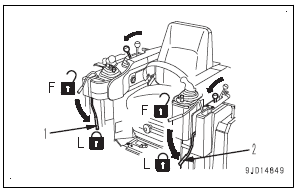
Set work equipment lock lever (1) and parking brake lever (2) to LOCK positions
-
Turn on the power supply of the control box. Power supply of the base station and starting switch of the
machine can be off. -
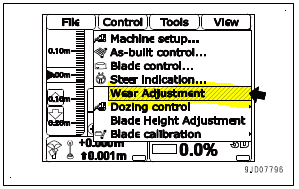
On the control box screen, press “iB logo key” and display the main menu.
-
Press “Wear Adjustment” in “Control” menu and select.
-
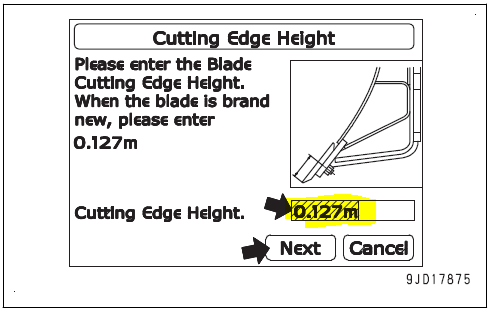
Measure the length from the tip of cutting edge to the centre of mounting bolt.
-
On “Cutting Edge Height” screen, press “Cutting Edge
Height” input portion and input the measured length. -
Press “Next”.
REMARK
• When the cutting edge is new, the length is 0.127 m
{5 in} .
• If you do not change
-
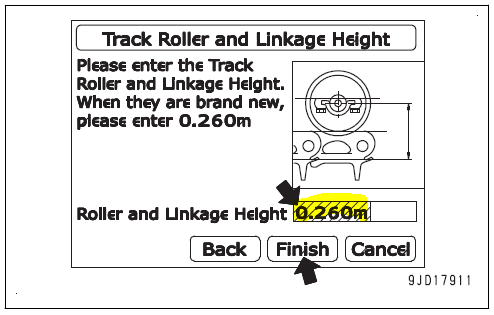
Measure the length from the top of track shoe to the center of track roller.
-
On “Track Roller and Linkage Height” screen, press “Roller
and Linkage Height” input portion and input the measured length. -
Press “Finish”.
REMARK
• When the track roller and track shoe are new, the
length is 0.260 m {10.2 in} .
• If you do not change the wear amount of track roller
and track shoe, press “Finish”.