From D65EXi-18 Manual
-
Set up base station
-
Move machine to an area near the control point where the height is measured correctly.
-
Conduct Cylinder Reset
-
Manipulate the blade to be parallel with the ground
-
Raise the blade above the control point, move machine straight to the control point, and stop machine.
-
While in neutral, lower the blade to align the (LEFT, RIGHT or CENTRE) cutting edge with the control point, but DO NOT let the blade touch the ground
-
Ensure the Elevation Control Key and Slope Control Key are lit green and the machine direction on the control box matches the actual machine posture.
-
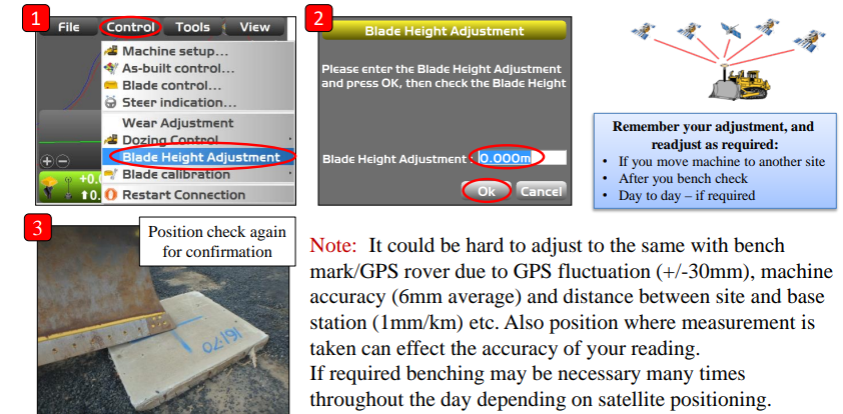
Press the power ON/OFF and menu switch to show the Main Menu. Select Blade Height Adjustment from the Control menu.
-
Enter the Benchmark Height
-
Select the point of the blade that was aligned with the control point in Step 6 (LEFT, RIGHT, CENTRE).
-
While keeping the machine control box on, turn the engine off. Once engine has stopped, turn the ignition switch to ON again.
-
Measure the height from the control point to the blade edge
-
Input the distance from the control point to the blade edge.
-
Press the measure button to the right of Blade Height Adjustment and the current blade elevation is measured. After the measurement is complete, the adjustment value is automatically calculated and populates in the final box.
-
Press OK to complete the adjustment.