-
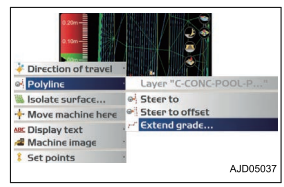
On the main window, hold down Polyline for Simple Grading and display the menu.
-
Press “Extend grade...” in “Polyline”
-
Input the grade of the leveling ground by using the numeric keyboard. The leveling ground surface (cross-sectional surface) which has the inputted grade is displayed on the Section view screen, and a horizontal line perpendicular to the polyline of Plan view screen is displayed.
-
Start Simple Grading. Repeat step 1 for other polylines