
How to activate Automatic Blade Control:
-
Set work equipment lock switch to FREE position.
-
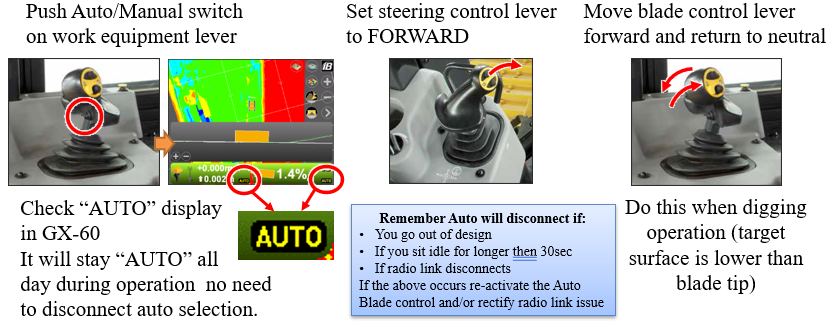
Push AUTO/MANUAL switch to set the automatic blade control to ON. When the automatic blade control is set to ON, the AUTO indicator is shown in yellow on the control box screen.
-
Set the joystick to the FORWARD position.
-
LOWER the blade. Do this operation while the blade edge is higher than the design surface and ground level where the tracks touch. Blade must be lowered to activate automatic blade control.
-
Set it back to NEUTRAL. The blade lowers automatically to the design surface or ground level where the tracks touch.
-
Drive the machine.
Green AUTO indicator = Active automatic blade control
Automatic Blade Control Features
Disconnecting Automatic Control
Auto-control will disconnect if:
-
You are out of the design area
-
You idle for longer than 30sec
-
Radio link disconnects