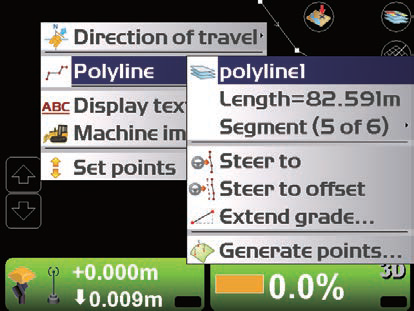
Polylines in the line work file can be used as a guide to display the route the machine should travel or control the blade during operation. Generally, a file containing the alignment file is used for operations of the route.
Polyline is used to display characteristics of the job site such as building bases, curbs, walkways, tops and bases of slopes, borders of projects, etc. It is also used to display the centreline of the alignment data. If each point constituting the polyline has 3D information, it can be selected on the main screen. Selected polylines are used as alignment data for steering display of the machine, or as design elevations to control the blade.
How to set Steer Indication options
-
Press the power ON/OFF button and display the main menu
-
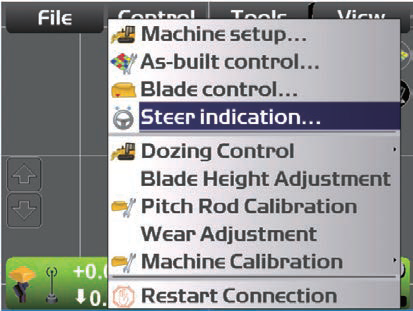
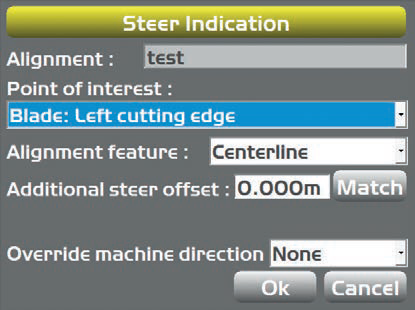
Navigate to Control > Steer indication… (Note: Steer indication menu will only be available when the Alignment file has been selected)
-
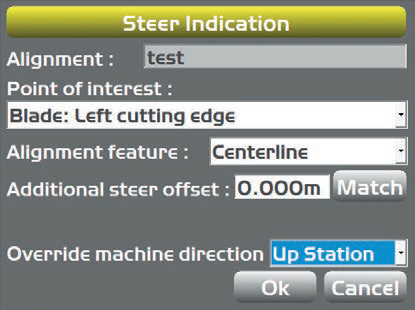
In Steer indication… select or input the following parameters:
-
Point of Interest (blade edge position)
-
Alignment feature (polyline position in Alignment data)
-
Additional steer offset (Distance to offset the target position from the position set in Alignment feature)
-
Override machine direction (Select “None”)
-
How to Steer to Polyline:
-
In the main window, hold down on the polyline to display the menu
-
Select Polyline. A horizontal line perpendicular to the selected polyline is displayed
-
Press the power ON/OFF to display the main menu
-
Navigate to Control > Steer indication… to edit the setting of the Steer indication
-
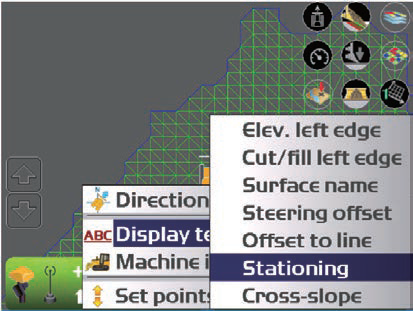
Hold down the Section view screen and display the menu
-
Press Display text (this will allow for additional steering information to be displayed on the Section view screen)