
|
# |
Content |
Target Function |
Overview |
|---|---|---|---|
|
1 |
Enhancement |
Data layer |
Terrain information (slope, elevation, and contour lines) was previously displayed in the upper-left corner of the map only for “Measurement” feature. It is now also available when the following features are selected: -Data Layers
This improvement allows you to reference terrain
|
|
2 |
Enhancement |
Data layer |
When opening the “As built linkage” from the “As built”, ICT machines with incomplete settings were previously not displayed. This has been corrected so that all machines assigned to the current site are now shown. In addition, each machine’s URN and Sitelink ID are now displayed, making it easier to check integration status. 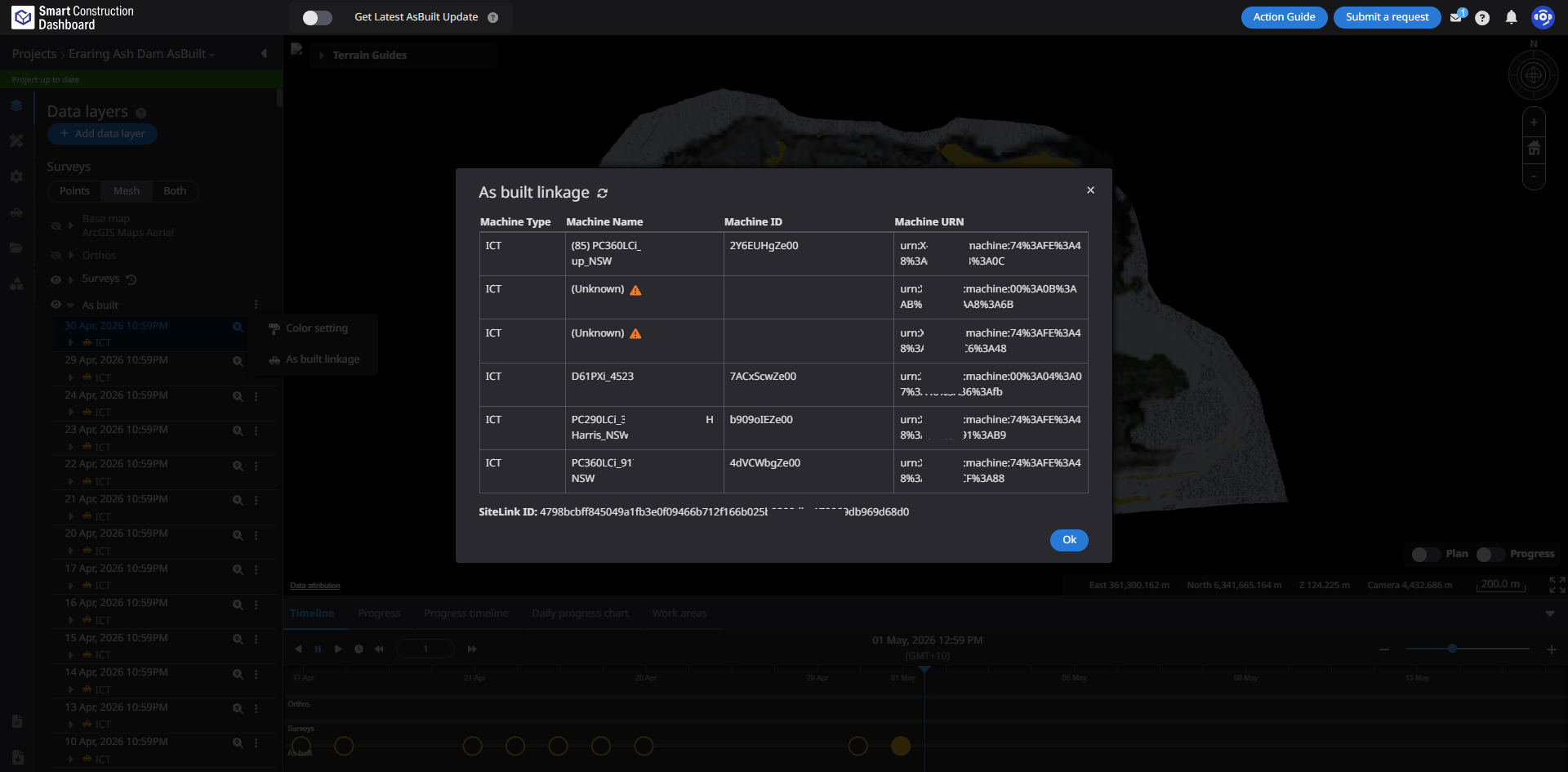
|
|
3 |
Enhancement |
Measurement |
Processing for Elevation history was previously executed each time the screen was displayed.
|
|
4 |
Enhancement |
PDF report |
Fixed an issue in PDF reports where parts of the detailed measurement view overlapped with the overall view, making the details difficult to see.
|
|
5 |
Bug fix |
Measurement |
Fixed an issue in 2D cross section where elevation values were displayed even in areas without the specified annotation line. Elevation is now shown only within the range defined by the annotation line, enabling more accurate verification of 2D cross section. |