
Make sure you have Project File Converter installed on your computer first - Download & Install Offline Project File Converter
Converting a project file using the offline ProjectFileConverter application.
-
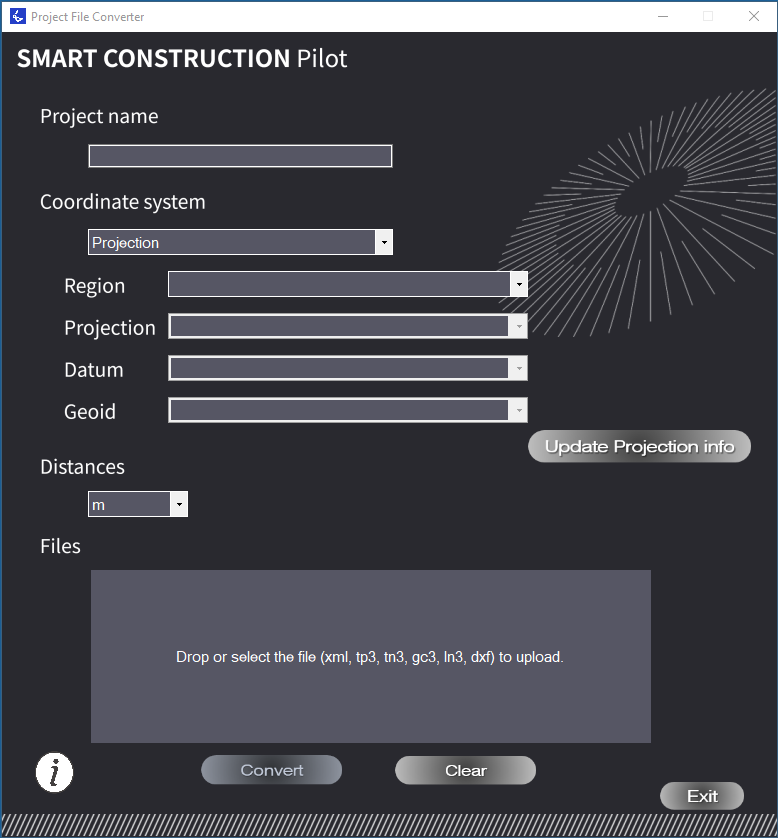
Open Project File Converter app.
-
Input “Project Name”
-
Select Coordinate system
- Choose “Localisation” or “Projection” -
If choosing a Projection, select the projection information you need to use for the project
-
Select Distance unit of measurement - “m”
-
Drag and drop or select the file to convert (LandXML, TP3, TN3, GC3 and DXF are available.
-
Click convert
-
Save the File
Send the file to the machine remotely, or via a USB
How to send the file remotely: Upload a file to Machine using SC Remote
For instructions on how to load the project file into Pilot once transferred to the screen: Downloading a Project / Design file from tablet local files or USB