Project File (*.tp3) - contains files of all types including control points, layers, point data and surfaces. It is imperative to be able to use machine control.
Importing Files
-
Insert USB to control box
-
Navigate to Menu > Project File Settings
-
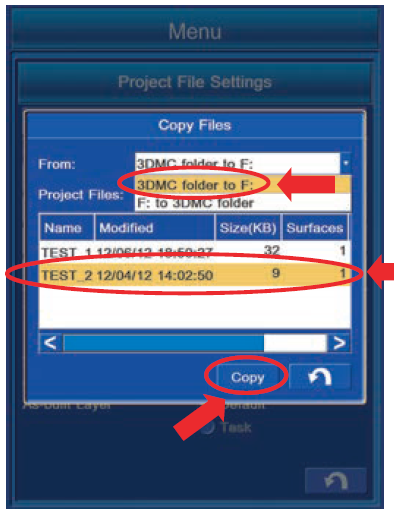
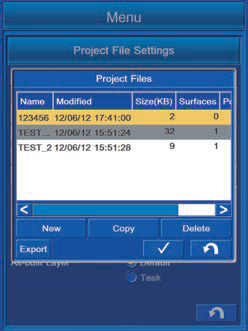
In Project File Settings screen select the file to be imported and press Copy
-
In Copy Files screen select:
|
D: to 3DMC folder |
|---|
-
Select the correct project file to be copied in the Project Files: drop down menu
-
Highlight the Project File to be copied and press Copy
-
Check if the file has been copied over by checking if the copied file is listed in the Project Files screen
Project file has now been copied.
Creating a Project File
-
Navigate to File > Project File Settings
-
In Project Files screen select New
-
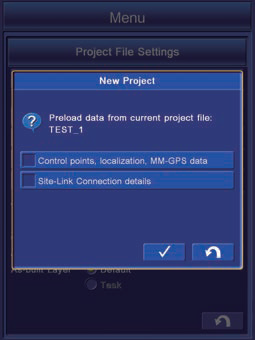
Select enter after ensuring both pre-load data boxes are de-selected
** Note: when creating a new Project File based on the data of the currently selected file, select the relevant pre-load data box (i.e. Control points, localization, MM-GPS data or SiteLink 3D)
-
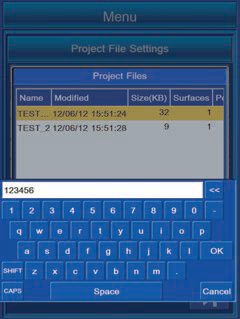
Input the Project File name in the new window and click OK
The new project file is now added to the project files list
Exporting a Project File
Pocket-3D is an application used for land survey. Through inputting survey points, design surface data, alignment data, etc in advance it is easier to navigate to survey points or cut positions or check the cut/fill amount while watching the screen.
-
Navigate to Menu > Project Files
-
In Project File Settings screen select the file to be imported and press Copy
-
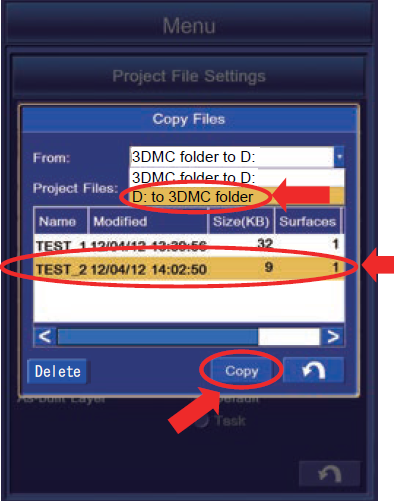
In Copy Files screen select
|
3DMC folder to D: |
|---|
-
Select the correct project file to be copied in the Project Files: drop down menu
-
Highlight the Project File to be copied and press Copy
Project file has now been copied to USB