Part of daily calibration / initial configuration
AL video walk-through 3DMG (TBA): [insert link here]
From manual:
**** Carry out Cylinder Reset prior to Benching ****
-
Ensure GNSS status is green:

-
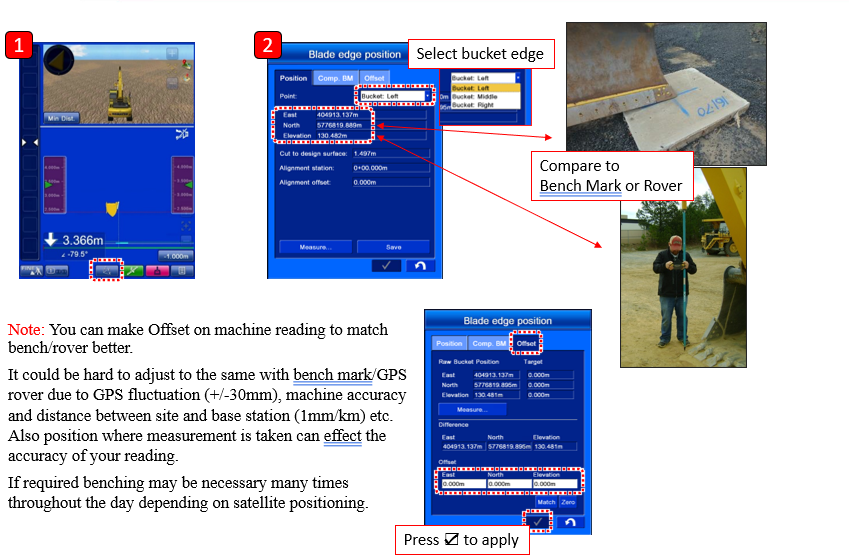
Go to Blade edge position screen (blue icon to the left of GNSS icon:

-
Set and measure a point on the ground with a control stake or survey rover, this will be the Bench Point
-
Select correct Point in Blade edge position screen, and place bucket accordingly to the Bench Point on the ground.
-
Input Northing, Easting and Elevation measurements from rover into Comp. BM {Compare Benchmark}
-
Move machine to now measured Bench Point, enter any elevation offsets into Comp. BM screen.
-
Set swing lock button ON and Lock lever ON.
-
In Offset tab, select Measure…
-
Raw Bucket Position gives the coordinates of bucket edge un-offset position measured with GNSS.
-
Difference = deviation between current bucket edge position and control stake coordinates
-
Ensure the deviation is within required tolerance range for work required, press the tick to return to the main display.
-
If the deviation of the coordinates is not within spec, tap Match - a compensation value is automatically calculated to make sure the bucket edge position matches the control point.
-
Use the Offset section to enter individual deviation compensations if needed.
-
Press the tick to return to the working screen & ensure bucket edge position button is outlined yellow.