
When using a project file for Pocket-3D or another application, export that project file to USB memory or the internal memory of the control box.
Pocket-3D is an application software for GNSS specially designed for land survey. By inputting the survey points, design surface data, alignment data, etc. in advance, you can easily navigate to survey points or cut positions or check the cut/fill amount easily while watching the screen.
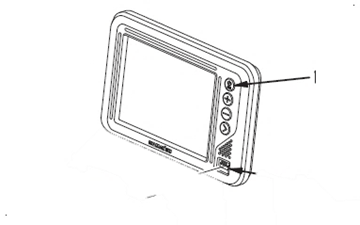
1. Hold down the power button (1) to turn on the control box. (Note: the power button is also the main menu button once the control box is turned on
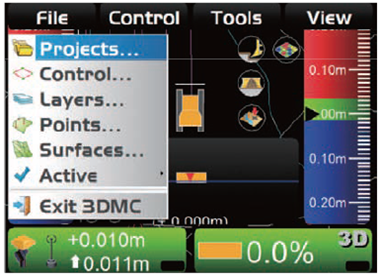
2. Press the power button again to switch to the main menu (“File”, “Control”, “Tools, and “View” will be displayed across the top of the screen)
3. On “File” menu, press “Projects...”
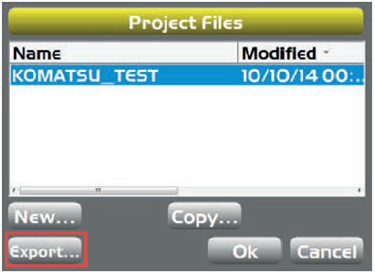
4. On the “Project Files” screen, press “Export...”.
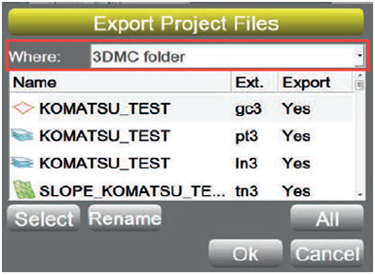
5. On the “Export Project Files” screen, select “Where:”
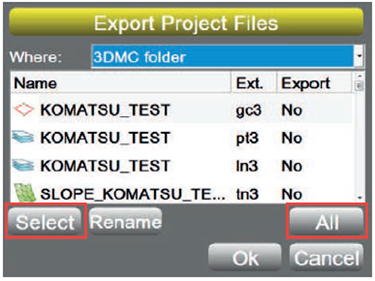
6. Select a file to export.
-
When exporting all files Select “All”.
-
When exporting files individually Select “Select” followed by selecting the individual files.
7. Select “Ok” to Export or “Cancel” to cancel the export.
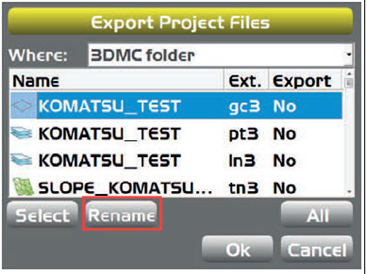
8. Select 1 file, and press “Rename” (You can rename the selected file and export it under a different name)
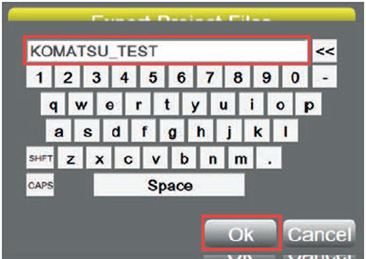
9. Type the new filename, and press “Ok”.
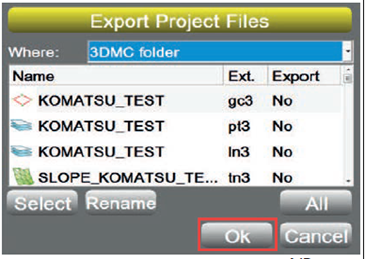
10. Press “Ok” and export the file (The screen returns to “Project Files” screen.)