
Edge 2 can process up to 50Ha of Processed Data Area Size.
This implies that the processed data must not exceed 50 hectares. For instance, if a flight is conducted over a 40-hectare site at an altitude of 60 meters, the photo's footprint extends beyond the flight boundary. As a result, additional data will be collected along the entire outer perimeter, leading to processed data of approximately 48 hectares.
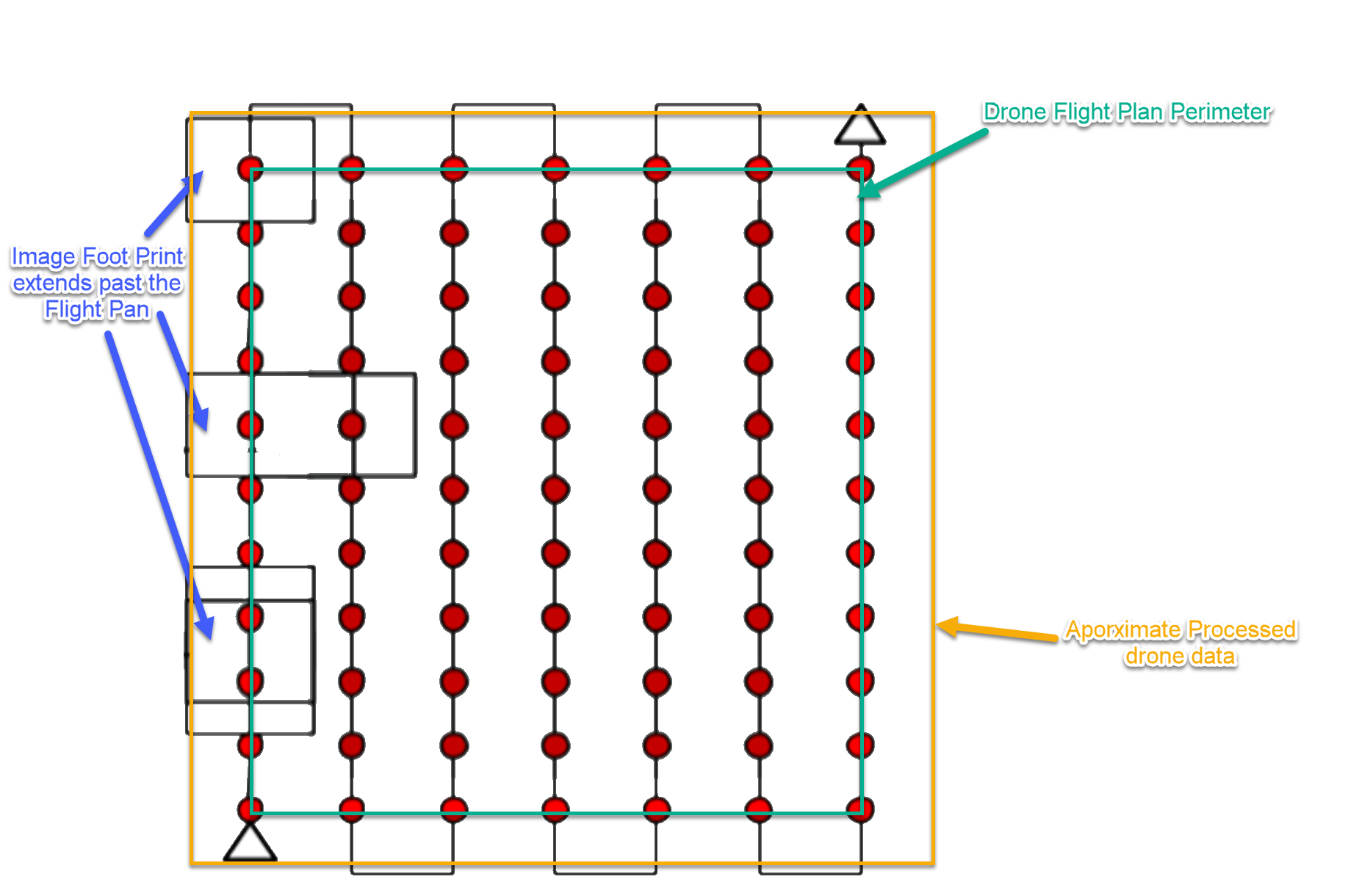
Do not create a flight plan that exeeds 42Ha. Edge 2 will not be able to process it.
Create flight plans based on the following guidance
Square or rectangle Flight plans:
-
37m Altitude (1cm GSD) < 42Ha
-
60m Altitude < 38Ha
-
80m Altitude < 35Ha
Linear Flight plans:
-
37m Altitude (1cm GSD) < 38Ha
-
60m Altitude < 35Ha
-
80m Altitude < 30Ha
| Description | Due date | Assignee | Task appears on |
|---|---|---|---|
|
iMC 2.0 UE PDI Checklist | ||
|
iMC 2.0 UE PDI Checklist | ||
|
iMC 2.0 UE PDI Checklist | ||
|
iMC 2.0 UE PDI Checklist | ||
|
iMC 2.0 UE PDI Checklist | ||
|
iMC 2.0 UE PDI Checklist | ||
|
iMC 2.0 UE PDI Checklist | ||
|
iMC 2.0 UE PDI Checklist | ||
|
iMC 2.0 UE PDI Checklist | ||
|
iMC 2.0 UE PDI Checklist | ||
|
iMC 2.0 UE PDI Checklist | ||
|
iMC 2.0 UE PDI Checklist | ||
|
iMC 2.0 UE PDI Checklist | ||
|
iMC 2.0 UE PDI Checklist | ||
|
Flex Home | ||
|
Flex Home | ||
|
Flex Home | ||
|
Flex Home | ||
|
2026-02-02 Meeting notes | ||
|
2026-02-02 Meeting notes |
|
Level |
Density |
Max. area size on 1cm GSD |
|||
|
Point cloud + Ortho + Object removal |
Point cloud + Ortho |
Point cloud + Object removal |
Point Cloud only |
||
|
Ultra High |
280p/m2 |
5 ha |
5 ha |
10 ha |
10 ha |
|
High |
100p/m2 |
15 ha |
15 ha |
30 ha |
30 ha |
|
Standard |
16p/m2 |
50 ha |
50 ha |
50 ha |
50 ha |
Flight Plan Calculator
Max. flight plan calculator.xlsx
Only input number of Legs & GSD in metre. Do not edit the other Cells