
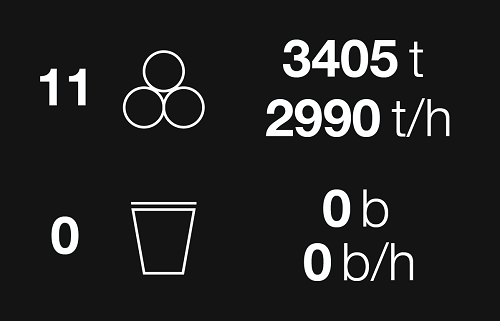
The Load Statistics card contains the following information:
|
Product Cycles |
Appears to the left of the product symbol . The total number of haul cycles that have been a product material for this machine, this shift. The number of product cycles increments upon first load pass of each cycle. |
|
Product Total |
Appears to the right of the product symbol. The total product material (tonnage or BCM) moved this shift by this vehicle. Displays the sum of every product material load pass in real time and recalculates when the load is finalised. |
|
Product Rate |
Appears to the right of the product symbol. The total rate per hour product material (tonnage or BCM) moved this shift by this vehicle. Displays the total product material per shift divided by the sum of the working and idle times since the beginning of the current shift. |
|
Waste Cycles |
Appears to the left of the waste symbol . The total number of haul cycles that have been a waste material for this machine, this shift. The number of waste cycles increments upon the first load pass of each cycle. |
|
Waste Total |
Appears to the right of the waste symbol. The total waste material (tonnage or BCM) moved this shift by this vehicle. Displays the sum of every waste material load pass in real time and recalculates when the load is finalised. |
|
Waste Rate |
Appears to the right of the waste symbol. The total waste material (tonnage or BCM) per hour moved this shift by this vehicle. Displays the total waste material per shift divided by the sum of the working and idle times since the beginning of the current shift. |


The Load Statistics card appears on trucks while loaded and hauling, and on loaders while they are waiting for a truck to attend.