
Introduction
The unloaded calibration routine is used to calibrate a new or existing bucket to an SC 3DMG machine fitted with the payload option to improve load accuracy result. The Unloaded Calibration routine is used to calculate a measurement for a specific bucket by using the empty bucket as the benchmark.
When to do Unloaded Calibration routine
The unloaded calibration routine should be performed when a new bucket is being used on the payload system. It should also be performed if the payload system has not been used for some time, prior to commencing work.
Calibration result is stored individually against each calibrated bucket in the 3D Machine Guidance section - you are not required to perform this unloaded calibration every time a bucket is changed unless the unloaded calibration has not previously been completed for that bucket, or if there has been a major change to the machine calibration or the machine itself since the last time the unloaded calibration was completed.
Preparing for Unloaded Calibration Routine
Please ensure to prepare the following steps and conditions prior to performing the Unloaded Calibration routine.
-
Ensure that the machine has been set up for Payload use. The easiest way to confirm this is by ensuring that the correct machine information is displayed at the top of the payload screen.
-
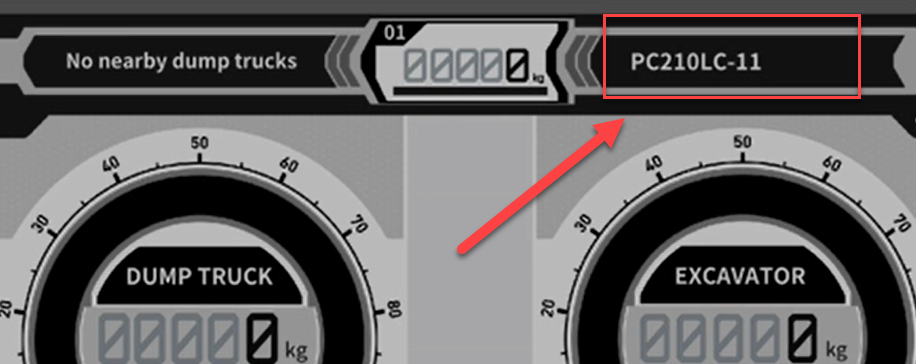
-
Consult the Smart Construction Support Centre for assistance if needed.
-
-
Ensure machine is parked in a safe area where there are no obstructions or people within the working range of the machine. Ensure all other safety procedures are followed and use a spotter if required.
-
Get the hydraulic oil temperatures up to standard working range by operating the machine or by using the relief valve.
-
The standard Hydraulic oil temperature working range to complete the calibration is between 40 to 50 degrees Celsius.
-
-
Park the machine on flat, level and stable ground. Ensure that the ground is stable throughout the entire slewing motion.
Performing the Unloaded Calibration Routine
To perform the Unloaded Calibration routine, start by accessing the menu in the payload interface in the application and press “Unloaded Calibration”.
Follow the instructions shown on the tablet app in order to complete the calibration.
Use the video shown here for reference if needed.