
THERE IS A POSSIBILITY OF SERIOUS INJURY OR DEATH.
• The payload meter is intended to assist the worker in measuring the load capacity and reduce the
operator’s burden of load capacity management. It is not for preventing overloading.
• Do not operate the machine while operating the tablet terminal screen. When operating the tablet
terminal, stop the machine operations.
• When operating the tablet terminal, be careful not to accidentally operate the control lever.
• Give priority to checking the safety of your surroundings. Do not look fixedly at the tablet terminal screen.
• During swinging, be sure to visually check the swing direction.
• Since it involves swing work, make sure that the other workers are kept out of the turning radius
throughout the work.
Notice
• The payload meter has a limit to its performance. The weight indicated by the payload meter may vary
due to the effects of factors such as soil adhesion, operation method, and soil property; thus, it should be
used only as a guide.
• The payload meter is not a measuring instrument that has passed the certification test. It should not be
used for trading or certification.
• When using for transaction of certification, check by using a measuring instrument such as a truck scale.
• If the vehicle is loaded with the vehicle body tilted excessively or with it unstable, the load cannot be
measured correctly. Make sure that the machine is kept level and stable as much as possible.
• Note that the error may vary depending on the operation method and conditions.
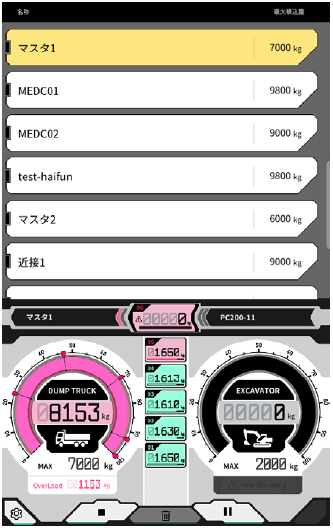
No. Content displayed
① Truck list (truck name / maximum loading capacity)
② Selected truck
③ Truck load volume displayed in gauge
④ Truck load volume displayed in value
⑤ Maximum loading capacity of selected truck (target weight)
⑥ Remaining weight loadable
⑦ Construction machinery currently setting (model―type)
⑧ Digging weight gauge display
⑨ Digging weight displayed in value
⑩ Approximate maximum bucket digging amount
⑪ Caution display when loading accuracy seems to be poor
⑫ Loading history for each time
⑬ Settings button
⑭ Loading start/finish button
⑮ Loading history delete button
⑯ Pause button
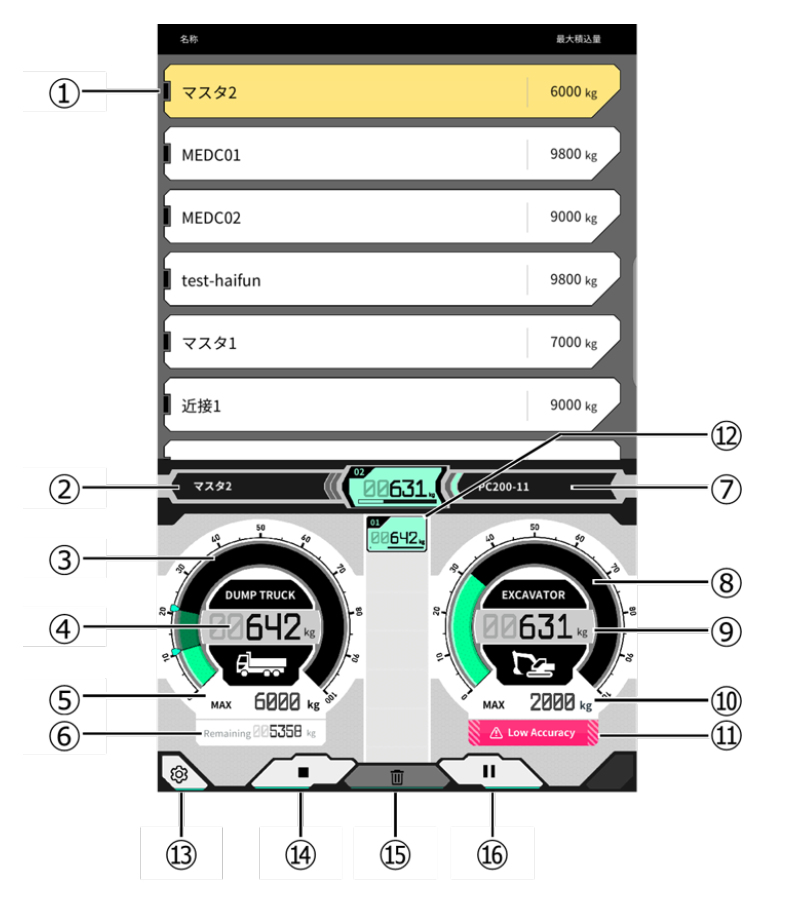
Truck selection
From the truck list at upper part of the screen, tap the target truck. The selected truck will be highlighted.
Start payload measurement
Before starting digging, tap ▶ to start measurement.
Count the load weight
When payload measurement is started and the construction machine is operated as Digging → cargo turning → bucket unloading, the payload value is counted when the bucket is unloaded and added to the truck loading volume.
Cancel the load weight
By tapping on the loading history, it will be highlighted. By tapping in that state, the highlighted history can
be deleted.
Finish the payload measurement
Once you have finished loading the truck, tap ■. The payload measurement finishes.
Pause of payload measurement
By tapping

during payload measurement, the payload will not be counted even if the bucket is unloaded. Use it when you do other work during loading.
Meter display function
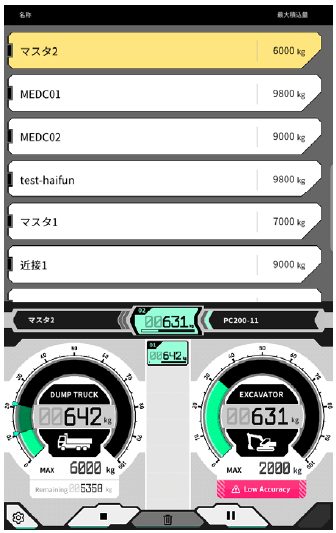
In the normal mode, both the digging weight and loading weight meters are displayed in green.
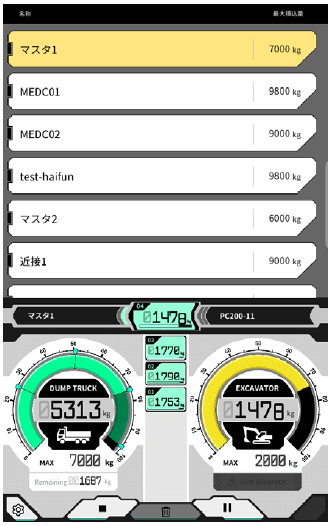
The digging weight meter is displayed in yellow when the target weight is almost reached after the digging is
done once more.
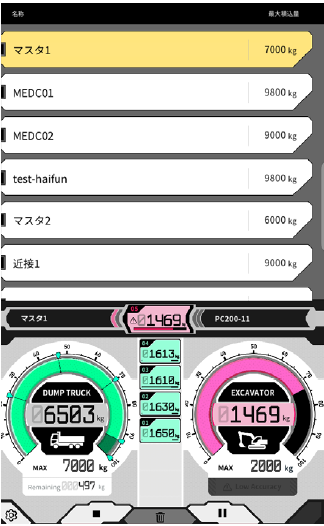
If the load weight is forecasted to exceed the target weight after the current digging weight is loaded, the digging weight meter is displayed in red.
If the truck is loaded with the target weight exceeded, the loading weight meter will turn red.
On the “Basic Settings” screen, it is possible to switch ON/OFF various payload functions.
Start automatic loading
When set to ON, loading can be started automatically ( ▶ button pressed) when a truck is tapped and selected.
Finish automatic loading
When it is set to ON, loading can be ended automatically (with the ■ button pressed) when the ratio selected in the “Finish settings” of the truck’s maximum loading capacity is exceeded during payload counting.
By tapping the “Exit Settings” list box, the threshold can be selected between 60-95% from the pull-down list.
Loading accuracy alert
When set to ON, a caution can be issued at the bottom of the digging weight gauge when the calculation accuracy seems to be poor during loading.
The threshold for issuing a caution can be set in the “Loading accuracy alert threshold.” (Minimum: 0 Maximum: 1)
The judgment standard is a value in which the value becomes smaller when the oil pressure is fluctuating and larger when the oil pressure is stable. As the caution is issued when the value is below the threshold,
・When operated keeping the oil pressure stable, it is unlikely that a caution will be issued.
・If the threshold is set to a larger value, caution is easier to be issued.
-
Do not change it unnecessarily.