
Initial Assessment
A GNSS fault on the machine can present itself in a couple of different ways. You can check the satellite receiving status on "GNSS Status". GNSS (Global Navigation Satellite System) via the following process.
Operation Method
If you tap button (1) on the screen, the screen changes to GNSS status screen and you can check the satellite receiving status. In GPS information, Main GPS" displays the information received by the antenna on the left side of the forward travel direction of the machine.
"Aux GPS" displays the information received by the antenna on the right side.
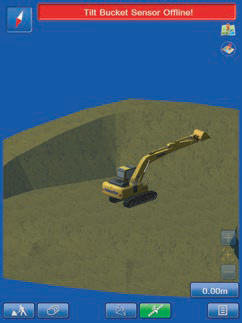
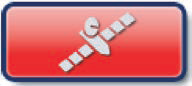
The colour of button (1) varies with the satellite receiving status.
Green (A): Satellite receiving status is good.
Red (B): Satellite receiving status is bad.
Remark
If the machine travels or swing while the button is red, the machine image may freeze. However, this phenomenon does not indicate a failure. When the satellite receiving status becomes good, the machine images is displayed normally. Wait until the button becomes green.

CHECK SATELLITE NUMBER AND POSITIONING ERROR (FIX)
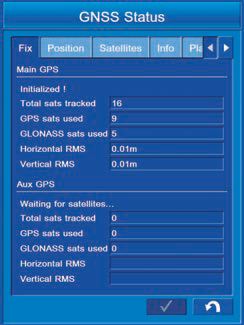
You can display the status of acquired GPS and GLONASS satellites and the coordinate error.
Tap "Fix" tab to select.
The same items are displayed on "Main GPS" and "Aux GPS" respectively.
(1) "Initializaed!"
The status of "Main GPS" and "Aux GPS" antennas is displayed.
(2) "Total sats tracked"
The number of the acquired satellites is displayed.
(3) "GPS sats used"
The number of GPS satellites which are used for calculation of the position is displayed.
(4) "GLONASS sats used"
The number of GLONASS satellites which are used for calculation of the position is displayed.
(5) "Horizontal RMS"
The horizontal RMS value (error) is displayed.
(6) "Vertical RMS"
The vertical RMS value (error) is displayed.
DISPLAY BUCKET EDGE COORDINATES (POSITION)
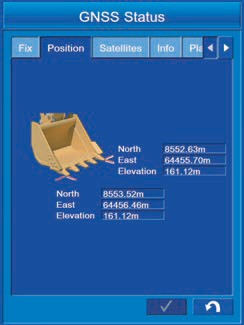
You can display the coordinates of the bucket cutting edge.
The coordinates of the left and right end of the bucket cutting edge are displayed by the set coordinate method.
Remark
When the inputted bucket width is the distance including the bucket
side cutters, its right or left end means the end of the side
INFORMATION OF GNSS RECEIVER (INFO)
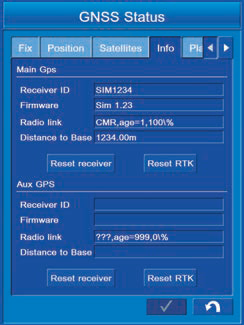
The information of GNSS receiver is displayed.
Tap "Info" tab to select.
The same items are displayed on "Main GPS" and "Aux GPS" respectively.
(1) "Receiver ID"
ID of GNSS receiver(MC-R3 or MCi-4) is displayed.
(2) "Firmware"
The firmware version of GNSS receiver (MC-R3or MCi-4) is displayed.
(3) "Radio link"
The connection condition to the GNSS corrections base station is displayed.
(Connection type, transmission/receipt delay time, and wireless quality are displayed.)
(4) "Distance to Base"
The distance to the GNSS base station is displayed.
(5) "Reset receiver" button
Tap this button before resetting the satellite information.
(6) "Reset RTK" button
Tap this button when connection is not made to the GNSS base station.
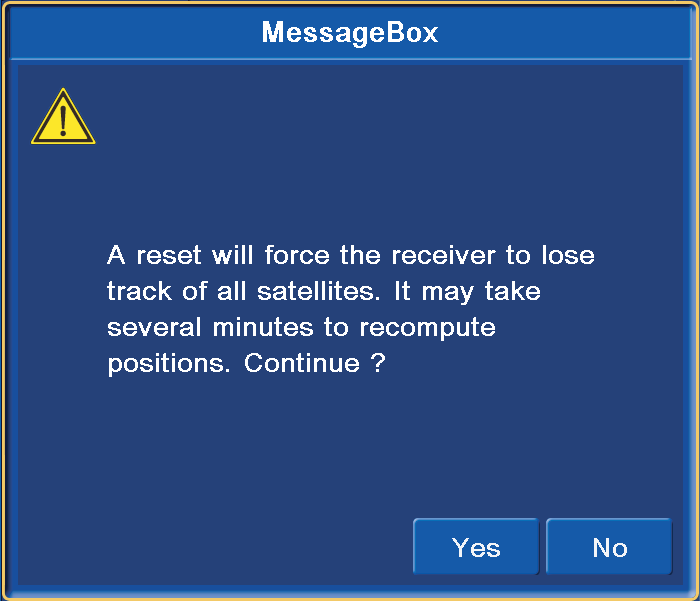
If the satellite information is not received normally, reset the satellite information of GNSS receiver (MC-R3 or MCi-4).
Tap "Reset receiver" button. The warning screen for confirmation pops up.
When resetting, tap "Yes" button.
When not resetting, tap "No" button.
Remark
If you reset, NVRAM (satellite orbit information, including the almanac information) is initialized. After initialization, it take approximately 15 minutes to obtain the latest almanac information again. If Intelligent Machine Control SYSTEM is not connected to the base station, tap "Reset RTK" button to reset the connection once.
Troubleshooting the hardware
The table below summarises the GNSS issue that are possibly found, and the related checks that should be performed.
|
GPS Antenna Short Circuit |
There is a possible hardware fault with the GNSS antenna or cable. Perform a continuity test between the cables core and connector. The two should not short-circuit. If they do, replace the cable. Perform a continuity test between the core and connector on the base of the GNSS antenna. The two should not short-circuit. If they do, replace the antenna. |
|
GPS Antenna Open Circuit |
There is a likely physical fault with the GNSS antenna or cable. The most likely cause is that the cable has been disconnected from either the antenna or GNSS Receiver, inspect both connections. If the cable appears fine, try replacing the antenna. If this still does not resolve the issue, contact Smart Construction Support Centre on 1300 445 978 or scsupport@komatsu.com.au |
|
GPS Antenna No Power |
There is a possible physical fault with the GNSS Receiver, GNSS cable, or antenna. Check the voltage between the core and connector at the connector on the back of the GNSS Receiver. A functioning receiver should be outputting approximately 3.3V to power the antenna. If it is not, contact Smart Construction Support Centre on 1300 445 978 or scsupport@komatsu.com.au Check the voltage between the core and connector of the GNSS cable at the antenna end. A working cable should be carrying approximately 3.3V to power the antenna. If it is not, replace or repair the cable or contact Smart Construction Support Centre on 1300 445 978 or scsupport@komatsu.com.au |