
The payload meter calibration is a function to use the payload meter function at maximum precision by correction of work equipment weight saved in the machine, the variation of sensors, and such.
The payload meter calibration is required in the cases that follow:
-
At the delivery of a new machine
-
When you change to an attachment for which payload meter calibration is not done even one time
-
When the weight or center of gravity changes, such as attachment and fall off of soil to/from the attachment or work equipment
-
When the machine monitor, ICT monitor, or controller is replaced
-
When the pressure sensor or IMU sensor is replaced
-
At specified interval (1 time in 3 months)
1. Preparation
-
Park the machine on level, firm ground.
-
Designate a clear, unobstructed testing area around the machine
-
Align the upper structure and tracks.
-
Check for errors: make sure no active failure codes are shown on the Maintenance menu (Current Abnormality).
-
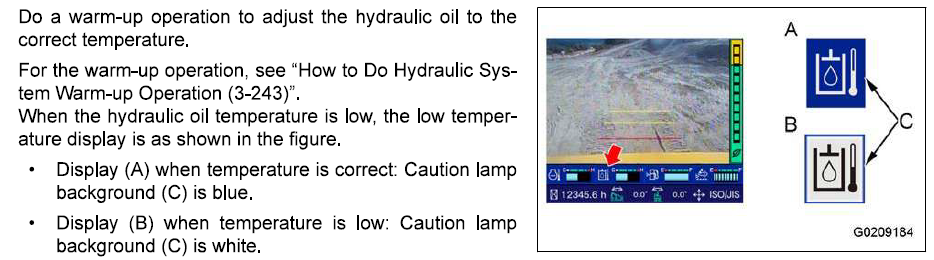
Warm up hydraulics: run the machine until the hydraulic oil temp is normal (not showing “low temperature” on the monitor).
2. Start Calibration
-
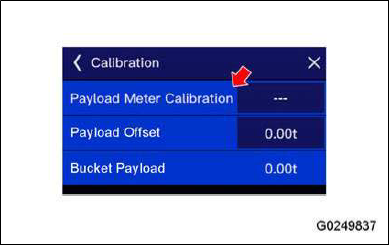
On the machine monitor, go to:
Adjustment → Payload Meter Calibration. -
Confirm the correct attachment type is shown (bucket, breaker, etc.).
-
Read the caution screen, then tap ✔ to continue.
3. Follow On-Screen Steps
The monitor will guide you through a series of machine postures:
-
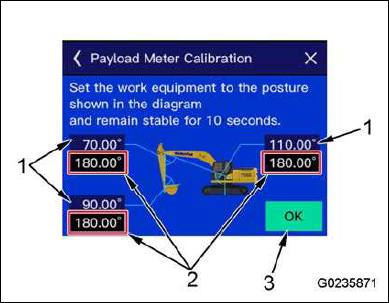
Initial Position
-
Place the boom, arm, and bucket in the displayed posture.
-
When angles match, the OK button turns green.
-
Hold position 10 seconds → buzzer sounds → complete.
-
-
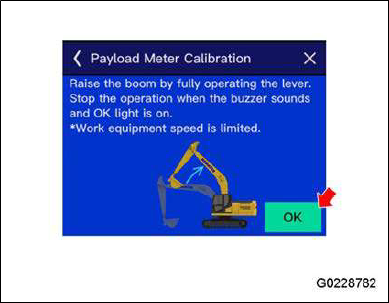
Boom Raise
-
Raise boom to full stroke.
-
⚠️ Note: Work equipment speed will be restricted during calibration.
-
Stop and hold until buzzer sounds → complete.
-
-
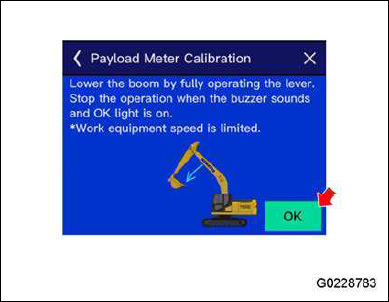
Boom Lower
-
Lower boom to full stroke.
-
Stop and hold until buzzer sounds → complete.
-
-
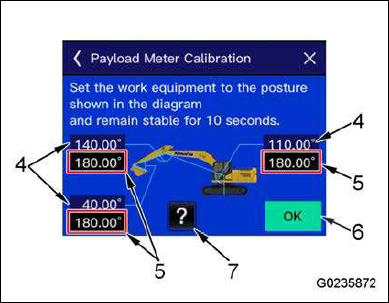
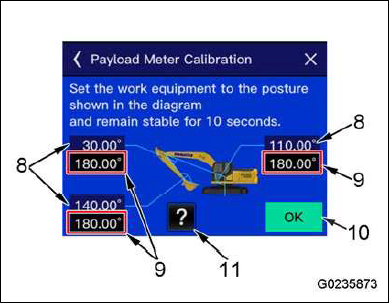
Arm & Bucket Postures
-
Place equipment in several additional positions (displayed on monitor).
-
For each, hold steady 10 seconds → buzzer confirms completion.
-
⚠️ Note: Work equipment speed will be restricted during calibration.
4. Finish Calibration
-
Once all postures are complete, a confirmation screen appears.
-
Select Apply Calibration Result → ✔.
-
The restricted speeds are restored, and calibration data is saved.
5. Payload Offset (Optional Fine-Tuning)
If weights still deviate:
-
Go to Payload Offset in the same menu.
-
Compare actual truck scale weight vs. bucket payload shown.
-
Enter the difference as an offset to fine-tune accuracy.
⚠️ Safety Warnings
-
Do not operate work equipment normally during calibration (only follow monitor steps).
-
Ensure no workers or obstacles are nearby — the bucket moves automatically.